I had the honour of co-chairing this year’s conference with Natasha Kenny. It was an incredibly rewarding experience, and I learned so much from being able to work with all 3 keynote presenters. The conference theme was centred around exploring digital transformation in postsecondary education:
From Disruption to Connection: Digital Transformation in Postsecondary Education
From the conference theme:
Digital transformation in higher education is here. Change is happening more rapidly than ever. GenAI is transforming assessment practices; traditional academic structures and programs are shifting to further meet learners’ needs; how, where, when and why we learn and communicate has expanded. With each new wave of change comes a familiar tide: an ebb and flow of concern and optimism about what this could mean for the future of postsecondary teaching and learning.
I approach vibecoding not as “this is the future of how all things will be built” but as “this is just one interesting way of prototyping and building custom tools that wouldn’t otherwise be built (and may be thrown away after trying them out anyway)”. I am confident that actual software developers2 who understand how things work and who employ a methodical and thoughtful approach will always be the core of how actual software is built and maintained.
I attended the National AI Summit in town yesterday. It was interesting. Half of the presenters were sharing thoughtful, reflective approaches to using AI as a tool to enhance creativity and learning while fostering (protecting? they said “protect” a lot) humanity. The other half were AI cheerleading, evangelism, and/or thinly-veiled sales pitches.
For the more-interesting sessions, there was much talk about the role of anthropomorphism in shaping the experience of interacting with AI tools. It struck me that anthropomorphism is the killer UX that makes AI feel real, like there’s someone on the other side of the chat interface. We see faces on toast, on rock outcroppings on Mars, in clouds (in The Cloud). We see patterns and intent where there isn’t (can’t be), and use that misguided inference to make predictions and fill gaps in our perceptions of the world around us (which, of course, includes the text output of chatbots). So, of course, we apply that to AI tools, and, of course, “this chatbot is real and has human feelings” because it makes keyboard-output that uses the same words that we use to express human experience.
I’ve been using a digital notebook of some sort since the 1980s, starting with a Casio Digital Diary, then, in the 1990s, a Newton MessagePad 120. Eventually, iPod Touch, iPad, and the software that they can run. Evernote. OneNote. Apple Notes. Obsidian. I gave up on iPads long ago and have just used my laptop to take and manage notes. I likely spend entirely too much time and energy thinking about how I take and manage my notes, because it’s a huge part of my professional, academic, and personal lives. I’ve been (affectionately?) described as “a dork” about this kind of thing.
The 2026 EDUCAUSE Horizon Report - Teaching and Learning Edition was just released. I had the opportunity to serve on the “global panel of experts” that brainstormed topics and examples to shape this year’s report. The brainstorming activities were done asynchronously, and it was really interesting to see the ideas shape up and connect to examples from various institutions.
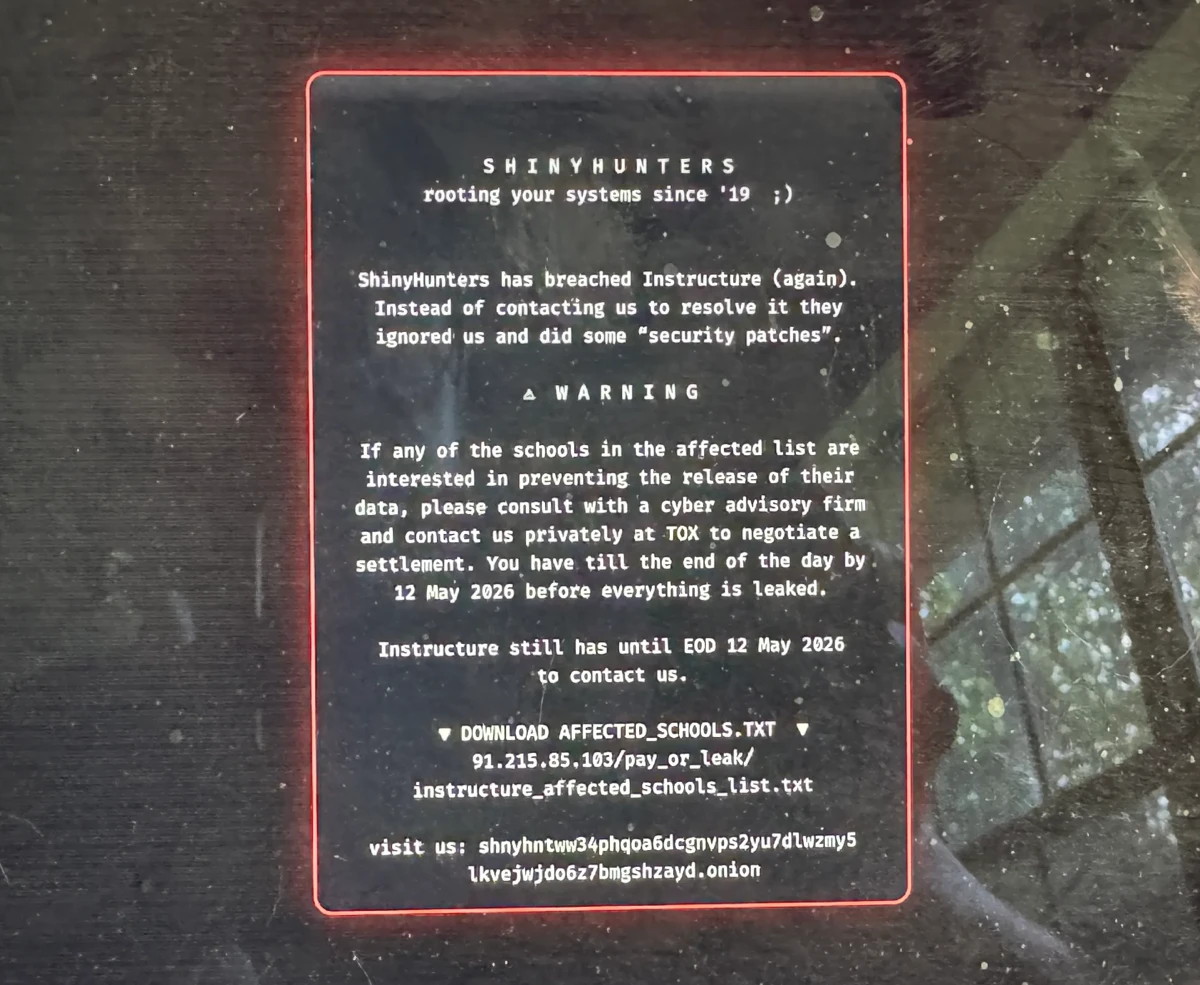
Canvas was hacked this week (starting around May 1, so over a week ago now). No details yet, and I’m not going to speculate or make assumptions. My heart goes out to the people at Instructure and the 8,800 institutions who are dealing with this. There are a few lessons from the incident and collective responses:
1. Clear and authentic communication is essential
Instructure’s initial response was to shut down the Canvas LMS and put up a “Canvas is currently undergoing scheduled maintenance” notice up. Which solved the initial problem of “people can’t access Canvas” but raised more questions. Eventually, word got out that Instructure had somehow been hacked - much of that coming from a message posted by the hackers themselves. Students posted screenshots of the hackers’ message on Reddit etc., and that served as the update for a few days.
When Google retired Jamboard, a lot of facilitators lost the tool they’d been quietly relying on. It wasn’t fancy. It just worked in a room full of phones, laptops, and a projector, with people who had no interest in making yet another account.
I’ve been building Jellyboard to fill that gap (well. Claude Code has been building Jellyboard…). It’s a browser-based sticky-note board for workshops, meetings, and brainstorming sessions. No installs, no ads or tracking, and no accounts for participants. Display a QR code, share a short join code, or paste a link into email etc., and people are in.
This was the 10th annual University of Calgary Conference on Postsecondary Learning and Teaching, and it had the highest attendance for an in-person offering of the conference. The theme this year was “From Disruption to Connection Digital Transformation in Postsecondary Education” and that turned out to capture a lot of attention and engagement across UCalgary and our broader community.
As I shared with the TI:
I’m still pretty overwhelmed by the conference experience. By the numbers, this was the biggest in-person offering in the 10 years of this conference. The numbers don’t capture just how great this year’s conference was, though!
Digital Transformation (Dx) in higher education has largely been framed as an organizational and IT challenge: enterprise systems, cloud migration, data governance, workforce development. That framing makes sense for the people leading those efforts, and the work is genuinely important. But it can leave a gap for those of us whose daily work is about teaching and learning. What does digital transformation look like when the starting point is pedagogy, not infrastructure?
I’ve been running this site on Hugo for several years now, and for most of that time I used other people’s themes and tweaked things around the edges. A few months ago, I decided to build my own theme from scratch with Claude Code. The theme is called Typeset.
Why build a custom theme?
The short answer: I got tired of fighting someone else’s decisions. Every borrowed theme comes with assumptions about what a blog is and what it should look like. Eventually those assumptions start getting in the way.
A mid-sized research university is developing its institutional response to generative AI. There is no single “AI project” - instead, there are dozens of overlapping conversations happening at different levels: individual instructors experimenting with ChatGPT in their courses, departments writing local policies, a provost-level working group drafting institutional guidelines, and national disciplinary organizations publishing position statements. Some faculty are enthusiastic, some are anxious, and most are somewhere in between.
Leading change in a university involves many kinds of participation at once. In any given week, the same person might chair a committee with real decision-making authority, serve in an advisory role on another, pilot something new in their own teaching, and sit in a conference session absorbing ideas they hadn’t considered before. Each of those is a different kind of engagement, and each contributes to change in a different way.