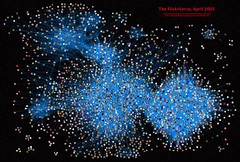
Update: I’m no longer using the Flickr Gallery plugin. I switched to use FAlbum, and it rocks nicely…
I just installed the Flickr Gallery plugin, which uses the Flickr API to incorporate photo albums from my Flickr account into this weblog. Small pieces, loosely joined. Rock on.
Check out the “Photos” tab on the top of the page (or, if you’re an RSSian, try this).
Have I mentioned how much I freaking love Wordpress and Flickr? Hey! You got Flickr in my Wordpress! You got Wordpress in my Flickr!
I’ve been using Apple’s .Mac Backup since it came out, and although it is a tad slow, it has been usable. Until recently. Now, it’s insisting on spitting out disks halfway through the burn, suggesting there’s something wrong. I can burn disks just fine using Toast or the Finder, so the drive and media are OK. .Mac Backup does take a LONG time to back stuff up (especially to CD or DVD) - there is the initial “how big is the backup” scan stage, followed by the “OK - really backing up now. let’s list all of the files” scan stage. Followed by the “OK - I’ve got the file list, let’s start copying them over to the disk image” stage, followed by “OK - files are copied. I’m actually going to burn a backup now” stage. Followed (finally, if it gets this far) by the “Let’s verify the backup” stage. Takes for freaking ever. When it works at all.
I just printed off a set of maps from maps.google.com to help navigate while driving from SFO to Sonoma State University (via downtown San Francisco to pick up Tim at SFMOMA). Incredibly detailed and easy to read maps, with great easy-to-follow descriptions.
I ended up printing off about 6 different maps, for different portions of the trip (zoomed appropriately). Much better than having to lug around a big “Bay Area Streetmap” atlas.
I’m just cleaning some files off of my desktop (computer, not physical - although I should really do that, too…) and came across the brief OmniOutliner file I started during the Finding Stuff session at MW2005. Here’s my lame/brief notes, posted here so I can find and remember the acronyms later…
Searching and museums
Sculpteur project (european)
CIDOC CRM (Conceptual Reference Model) semantic representation of items in a collection, and the relationships between them (object is a painting, created by a user, who lived in a city, which was home to these other painters…)
Semantic representation of properties and relationships
Much richer descriptions than Dublin Core
CBIR
context-based searching
find things with a similar colour/pattern to this one…
Not sure if/how I’ll use this, but FreeTag sure sounds cool. It’s a PHP/MySQL magic widget that lets you add folksonomies and tags onto existing MySQL databases…
Wow. THAT was easy. When creating a new weblog post, just use the “Attach File” section near the bottom of the form to select an .mp3 file. It will be automatically uploaded to this server and inserted into the RSS feed for distribution by subscribers! Then, if they have an RSS aggregator application that understands enclosures (podcasting), it will be automatically downloaded.
It literally can’t get easier than that! Let the University of Calgary podcasts begin!
I just finished adding the last round of users to the Pachyderm account database. We’re up to 118 beta testers, spread all over North America (and a handful of European and Asian representatives as well).
I got to add each account manually, so I hope I didn’t mess anyone’s names up… Let the bug reports fly!
I just went through the first round of updating the Drupal installation on weblogs.ucalgary.ca - not as seamless as updating a Wordpress installation, but perhaps I’m a bit spoiled there…
If I hadn’t been using any non-stock modules or themes, it may have been a trivial update, but I had to tweak a whole bunch of MySQL tables used by modules (and re-install many of the modules themselves) in order to get things working.
I’ve been using SubEthaEdit as my primary text editor for a while now, and have come up with a list of things that would be nice to have in SEE.
multi-file searching. I just had to revert back to BBEdit to do this so I could modify a whole bunch of XML files. It would be cool if I could perform searches across entire directories (with the option of running recursively…)
Highlight the current line a bit better. JEdit does this quite nicely, and it makes it very easy to track what I’m doing if I have say 4 open documents. Just have a subtle border, or slightly different background colour on the line containing the text insertion cursor.
Reformat text. This would indent XML, stylize java, etc… Bonus points for having per-language options like inserting stub javadoc comments into java code, and fixing/flagging invalid XML/HTML
That’s really about it. I had some minor difficulties doing a funky regex-based search, but that speaks more to my (lack of) experience with regex, rather than SEE’s ability to handle proper regex…
If you’re looking for me today - I’ll be out of the office. I just got a call from Janice. Her father was just rushed to the hospital for some unknown (yet) reason, and is in critical condition in the Foothills Hospital. I’m heading home to watch The Boy so she can be at the hospital.
If you have any karma to spare, please send it his way.
Update: Looks like he’s not in critical condition any more. He’s parked in a hallway, so it may be less serious than they initially thought.
First, I ran the 10.3.9 Client update on my laptop, and rebooted to make sure Java and WebObjects was happy (there were rumours that they may complain after the update). No complaints - everything worked as expected.
Then, I started updating servers. I tested the 10.3.9 Server update first on careo.ucalgary.ca - that went well, so I ran it on commons.ucalgary.ca. That also went fine, so I ran it on apollo.ucalgary.ca