I’ve been using a digital notebook of some sort since the 1980s, starting with a Casio Digital Diary, then, in the 1990s, a Newton MessagePad 120. Eventually, iPod Touch, iPad, and the software that they can run. Evernote. OneNote. Apple Notes. Obsidian. I gave up on iPads long ago and have just used my laptop to take and manage notes. I likely spend entirely too much time and energy thinking about how I take and manage my notes, because it’s a huge part of my professional, academic, and personal lives. I’ve been (affectionately?) described as “a dork” about this kind of thing.


One thing that feels like it’s going to stick is using Obsidian as the database for my notes. I even have a Series here on the blog about it: Obsidian Notebooking. I’m pretty happy with how I’ve built that system into a kind of loose-zettelkasten combined with team and project notes. It’s an ever-growing collection of sometimes-interconnected info.
And, after thinking about it over the last couple of weeks, even that had turned into something of a cargo cult rather than a useful tool. If I just collect enough data, connect it deeply enough, then, surely then, it will finally all make sense! I wound up with thousands of notes that I never referred to - items starred from NetNewsWire subscriptions, clippings from web pages, articles, old archives. Just sitting there taking up space and making things like The Graph look a) cool and impressive and b) utterly useless to actually make sense of anything. So I just deleted all of those. My Obsidian vault is now a set of collections (database-like notes), and a set of notes from meetings and projects etc. (Almost) everything else is gone. Progress, maybe?
I have never liked using a laptop during meetings. First, having a literal screen separating me from people I’m talking with is a barrier. And typing notes seems to somehow push me to feel like a stenographer rather than taking meaningful notes. Transcribing a conversation rather than using the notes as a tool to make sense, make decisions, to think. It’s a pattern I’ve always struggled with - as an undergrad I thought I could learn more if I could just write notes fast enough to capture it all. And, in the process, didn’t actually hear anything, so of course I struggled. Decades later, and the tendency is still there.
As long as I’ve been using digital notebooks, I’ve kept coming back to paper and a good pen. It feels better, I think more clearly, and I think I wind up with a better set of notes that mean something to me. Except they’re not organized or searchable, and they’re somewhat arbitrarily broken into chunks with a year or two in a notebook, pages in strict chronological order, no index or table of contents.
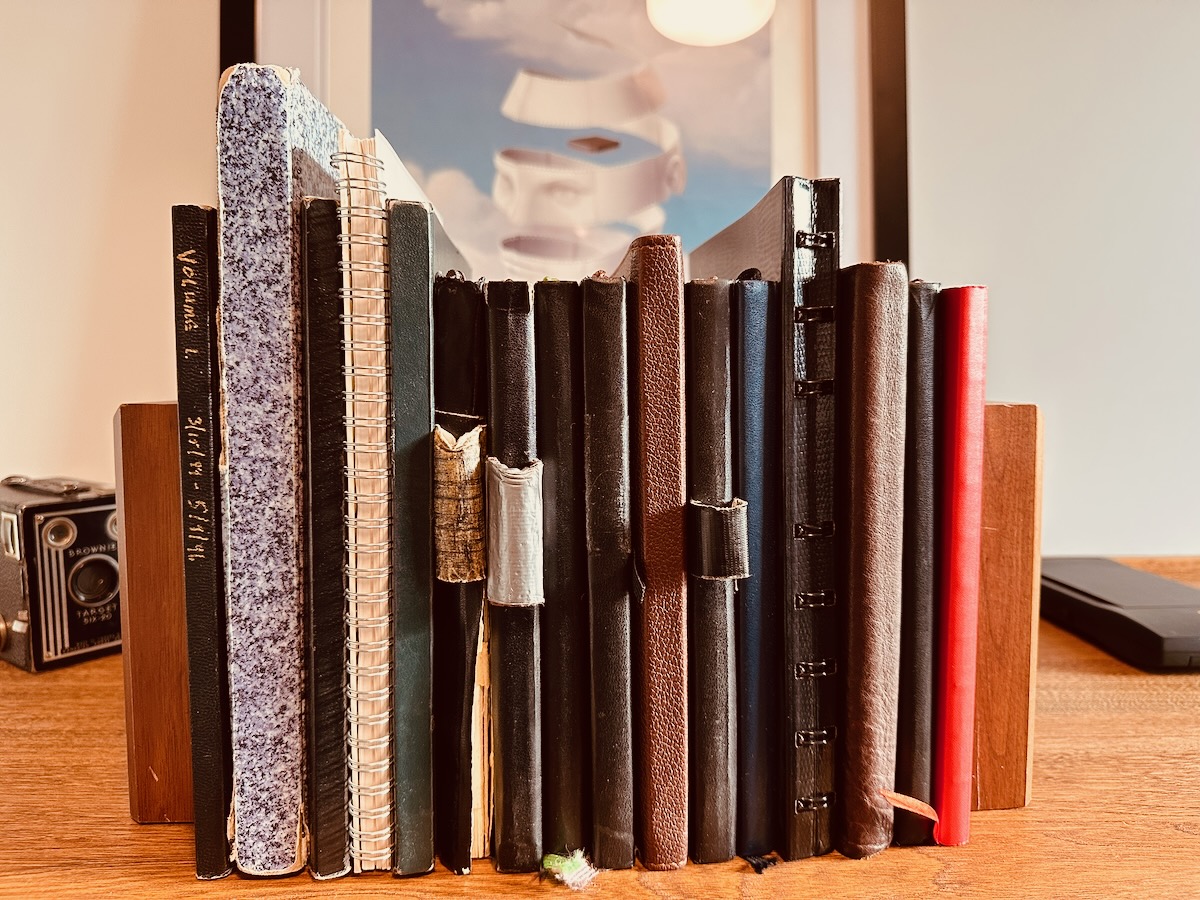
Three decades worth of paper notebooks
Starting on the left at 1996, through to 2026 on the right. The third notebook from the right is my PhD work. The tall speckled one on the left includes development notes for 2 learning management systems. Lots of stuff in between.
Image by D'Arcy Norman
Lately, I’ve been pretty happy using a paper notebook (the red one on the far right in the photo above) with AI transcription into Obsidian. I have a Claude project that has a prompt that means I can fire up the Claude app on my phone, start a new chat, add a few photos of notebook pages, and it transcribes into markdown that I can take into Obsidian. A huge improvement, but still some manual steps (take the photos, copy the output, paste into Obsidian notes), and my paper notebook has no ability to search for or refer to previous notes.
And so, in my never-ending quest for The One True Notebook, I picked up a new reMarkable Paper Pure. The Pro is ungodly expensive, and I just couldn’t justify it. The new Paper Pure brought it down to just eye-wateringly expensive, so I figured I’d give it a shot. I haven’t had a chance to use it at work yet, but it’s by far the best digital ink experience I’ve ever had. It just feels like writing on paper with a pen. The software is OK, and the Connect sync service looks like it will be useful.
One of the big draws (to me) of the reMarkable tablets is that they don’t have apps. They’re just notebooks. I can’t check my email, or calendar, or Teams, or Zoom, etc. It’s just notes. But notes can be imported in PDF or ePub format to read on the tablet. Which means I can export info from my Obsidian vault into a PDF to load onto the tablet for reference. So I Claude Coded a new script that takes my entire collections of Topics and People, and Meetings from the last year, and generates an almost-1,500 page PDF Vault export snapshot.
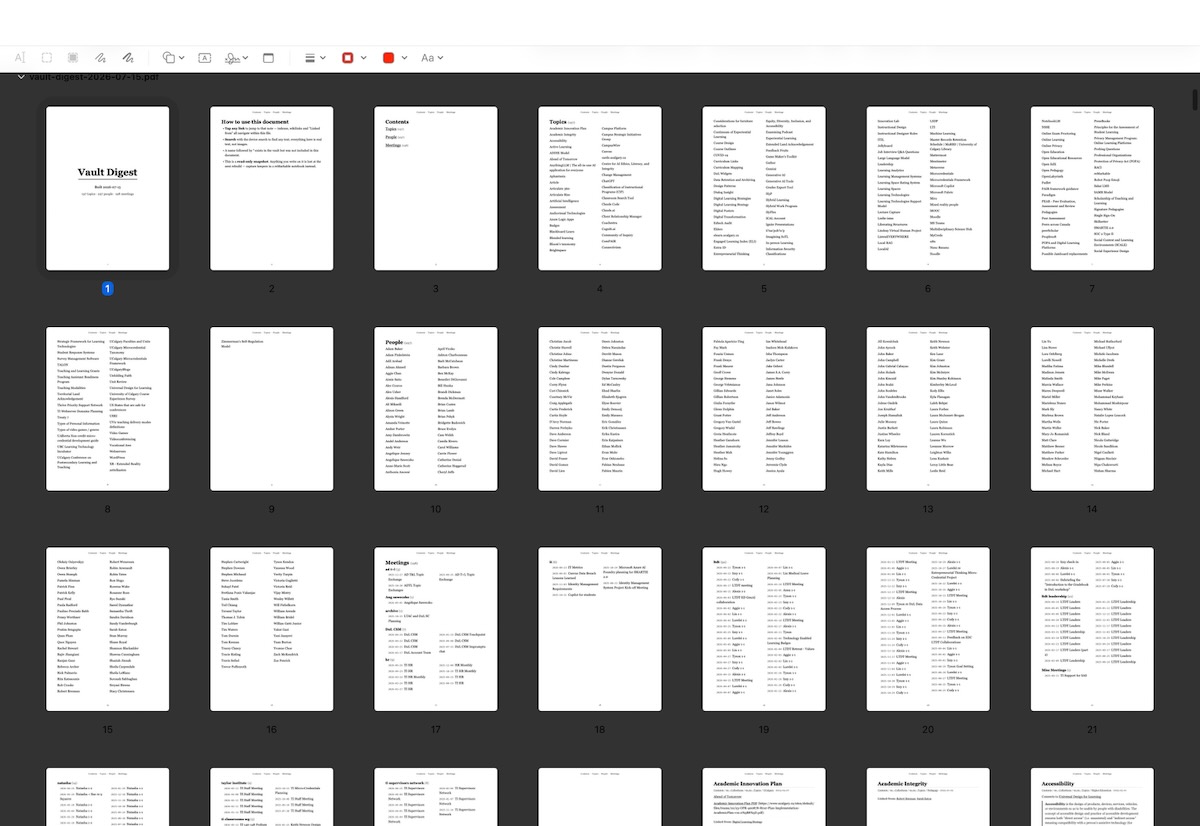
Thumbnails of pages in the Obsidian Vault export
A PDF with something like 1,400 pages containing notes exported from my Obsidian vault. A Contents page links to tables of contents for Topics, People, and Meetings.
Image by D'Arcy Norman
Awesome. That’s definitely progress. If I need to refer to something but am intentionally not bringing my laptop (see above about the literal screen separator), I can still access important info.
Next, how to get notes from the tablet into Obsidian? There’s a Remarkable Sync plugin that seems to work really well. It’s a bit clunky, but it imports the digital ink of notes into image files in my Obsidian vault. The rendering of the ink isn’t completely faithful (things like highlighting turn into black blobs, some pen styles look really weird, etc.), but it’s a start. I actually built a custom Obsidian plugin that would take the imported note images, feed them to Anthropic’s API for transcription, and create markdown notes from them. It worked, but felt simultaneously fragile and overkill. Then it hit me - an Obsidian vault is just files. There’s a better way. So I gave up on my Obsidian transcription plugin and started a new approach.
Because an Obsidian vault is just files, anything that can write a file can already integrate completely with my Obsidian vault. So I fired up Claude Fable to develop a plan for the best way to implement this. It created a python script that proved the concept, so I had it write up a development plan that I could hand to Claude Code to build a fully native macOS application to do this.
Now, I have a custom rm2md application that does exactly what I want as part of this workflow. I can export a PDF of a notebook from the reMarkable app, open it in rm2md, and hey presto it creates really good transcribed notes and markdown files that get saved into a folder within my Obsidian vault. Then, I can adjust as needed, add any additional metadata and links, and file them into their appropriate destinations. I’m thinking I’ll do this monthly, and then re-generate the PDF Vault export snapshot so I have a current “database” for reference.
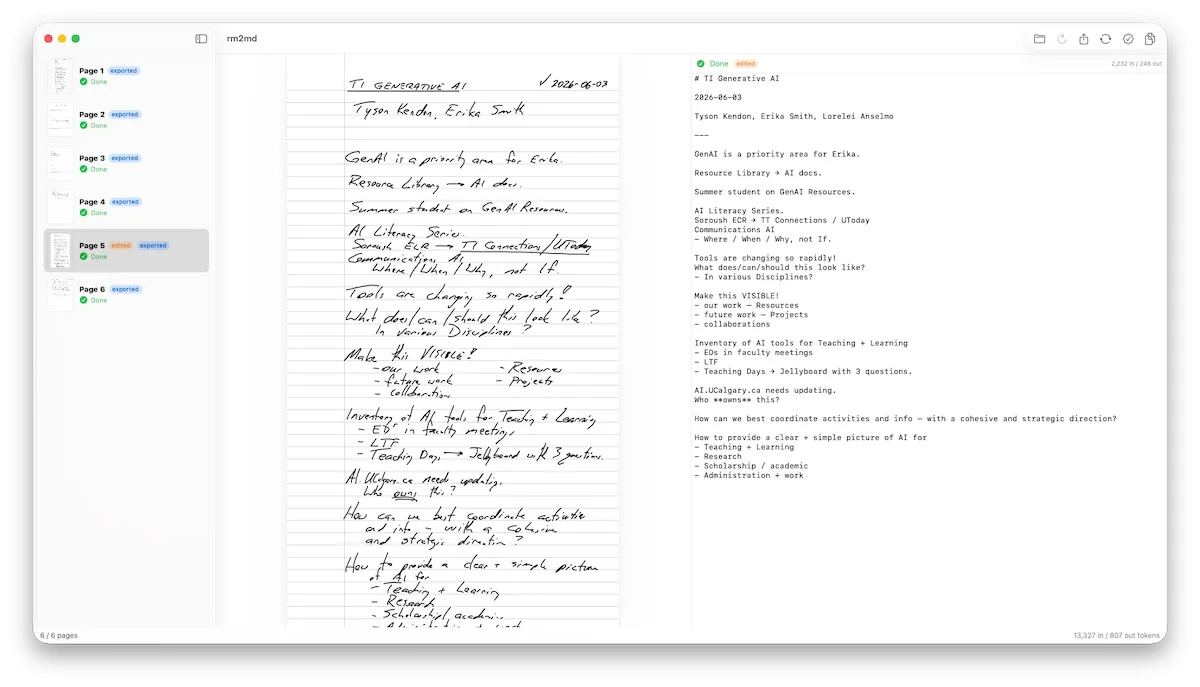
Screenshot of the rm2md application
On the left, a sidebar panel showing thumbnails for all pages in an open PDF document. In the middle, the handwritten notebook page. On the right, the transcription output in markdown format.
Image by D'Arcy Norman
AI-Generated Content via Claude Code, Opus 4.8
RM2MD is a macOS app that turns handwritten notes into clean Markdown for an Obsidian vault. Drop in reMarkable/scanned PDFs or photos of handwriting (iPhone HEIC, JPEG, PNG, and other image formats), and it transcribes each page using Claude’s vision models.
Core flow:
- Import — drag in or pick any mix of PDFs and images; multi-page PDFs and individual photos flatten into one page list.
- Transcribe — pick all pages or a subset; each page is sent to the Anthropic API and returned as faithful Markdown (headings, lists, tasks, tables, math as LaTeX, sketched diagrams as Mermaid). Blank pages are detected; failures retry with backoff.
- Review — side-by-side rendered page and editable transcription, per-page re-run, edited/reviewed badges.
- Export — writes one Markdown file per page to a folder, with Obsidian frontmatter and smart filenames derived from each note’s date and title.
I’m taking a bit of a risk, feeding notes into Anthropic’s API. They claim they don’t use API data for training, so I’m taking them at their word. If nothing else, this API approach should be safer than my “hey let’s just send photos of notes to Claude using the iPhone app what could go wrong?” previous workflow…
I’m going to be trying really hard to keep the tablet just as a note taking tool, not a repository. Notes will get transcribed and deleted approximately monthly. My folder structure on the tablet currently looks like:
- 0 Capture (ephemeral bits, sketches)
- 1 Meetings (currently with one notebook - Meetings - 2026-07)
- 2 Working (for longer-term project thinking)
- 8 Reference (the Obsidian Vault Export, and folders for Reading (documents, PDFs, ePubs, web pages saved from the “Read on Remarkable” extension (but hopefully not turning into another ever-growing pile of crap I never actually get around to reading…) and UCalgary Plans))
And one file. Calendar.pdf (a 12 month calendar pdf thing generated by ReCalendar) that I can mark up as needed. It doesn’t sync to anything, and our IT blocks any integration with M365.
That’s it.
Anyway. I haven’t tried this in production yet (I’ve been on vacation for a bit) but think this will do what I’m looking for. Surely, this time I’ve found the One True Notebook System that will finally make everything click into place…