When Google retired Jamboard, a lot of facilitators lost the tool they’d been quietly relying on. It wasn’t fancy. It just worked in a room full of phones, laptops, and a projector, with people who had no interest in making yet another account.
I’ve been building Jellyboard to fill that gap (well. Claude Code has been building Jellyboard…). It’s a browser-based sticky-note board for workshops, meetings, and brainstorming sessions. No installs, no ads or tracking, and no accounts for participants. Display a QR code, share a short join code, or paste a link into email etc., and people are in.
Joining a board
Joining is usually the friction point: URLs that are too long to type, QR codes that need a working camera, PIN fields that add an extra round trip. Jellyboard collapses all of that into a single string.
A board’s join code looks like ABC12-1234: five letters, optional dash, four-digit PIN. Participants visit the home page, type that into the join box, and they’re in. Pasted or clicked-a-link-in-an-email full URLs work too, and if a board has no PIN, the bare short code is enough.
For projection, there’s a fullscreen Workshop join display built for the back of a room: oversized join code, auto-fill QR, plain join URL, and the PIN, all on one screen. In practice, the QR code is what people end up using.
The canvas
Each board is an infinite canvas with pan, zoom, and a fit-to-content button. Notes are draggable, resizable, colour-coded sticky notes that grow as you type. Double-click (or double-tap on a phone) to edit. A floating format bar handles bold, italic, links, and two heading sizes, stored as raw markdown and rendered live.
Beyond plain notes, there are a few things that matter for sense-making:
- Groups. Visual frames you drag a lasso around to cluster notes by theme. Move the header and everything inside moves with it.
- Connections. Shift-drag from one note (or group) to another to draw an arrow. Line style (solid, dashed, dotted) and weight are configurable per connection.
- Plus / star voting. Every note has a one-tap upvote button for an easy signal.
- Snap-to-alignment. Drag a note near another and it snaps to edges or equidistant spacing. Toggle a 28 px grid on if you want stricter alignment. Hold Alt to bypass.
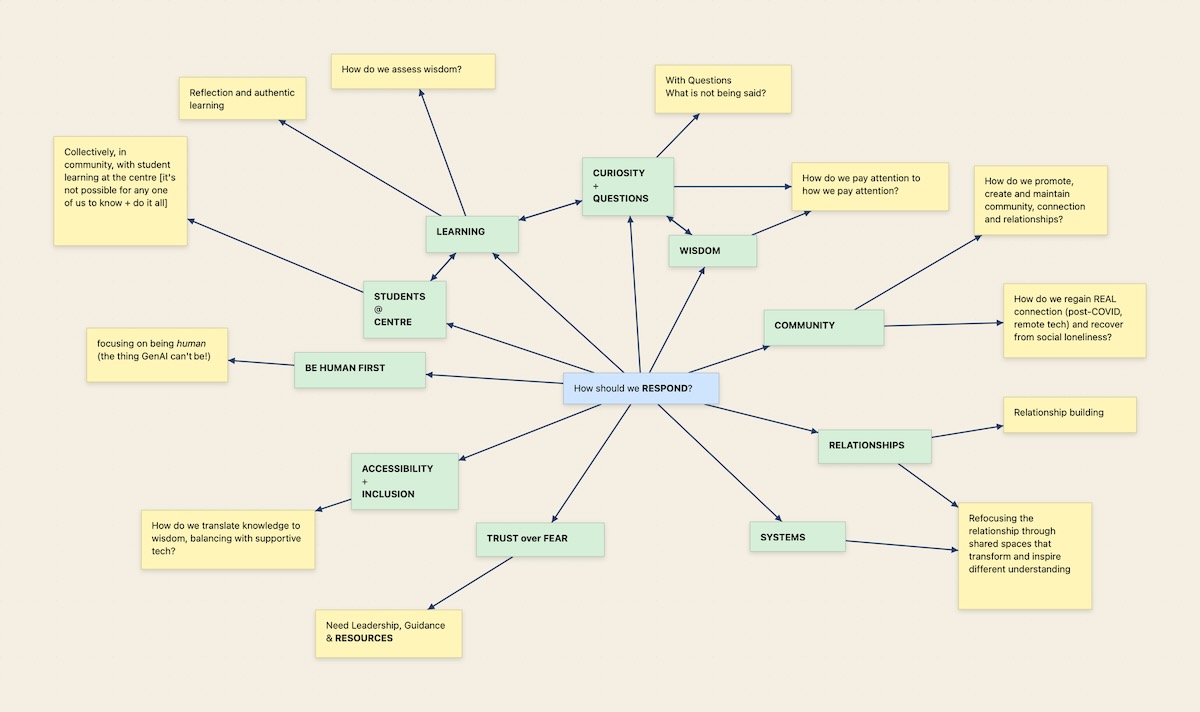
A sample Jellyboard
Created from the whiteboards used in our recent conference session
Image by D'Arcy Norman
Multi-page boards
Boards can have any number of pages, each with their own notes, groups, and connections. Owners add, rename, and delete pages from a tab strip at the top of the canvas. The pattern that’s worked best in practice is one page per activity, or one page per breakout group.
When the facilitator clicks “Bring everyone here”, every connected client animates to the same viewport. That works across pages too: if you’re on a different page, you’ll silently switch first, then animate to the right spot.
Roles, mostly without accounts
Four roles:
| Role | How they sign in | What they can do |
|---|---|---|
| Board creator | Account, via email magic link | Full control of any board they create |
| Co-facilitator | Account, via email magic link, sent by the board creator | Same powers as the creator on that board |
| Editor | PIN entry, optional display name (no account) | Create and edit own notes |
| Viewer | None (public boards) | Read-only: pan, zoom, export |
No participant ever needs an account. Editors join with a PIN and pick a display name. Viewers don’t even do that.
Things that matter once a session is running
A few features that came out of watching real workshops use it:
- Live presence counter in the board bar: how many editors and viewers are active in the last 60 seconds.
- Editors-online panel (facilitators only): display names, role badges, and relative session ages, polled every 10 seconds. Emails are never exposed.
- Mini map: a 200×140 overview in the bottom-left showing every note and group on the current page, with a viewport rectangle. It automatically appears if content extends outside of the viewable area in your browser window. Click or drag to jump.
- Presentation mode hides all the chrome, goes fullscreen, and exposes a slim pill with prev/next page, fit, and exit. ← / → step through pages.
- Mobile and touch support: pinch to zoom, single-finger drag, double-tap to edit, ~44 px hit targets on phones.
- Live sync across browsers, phones, and tabs. Conflict-aware, so a remote update won’t yank a note out of your hands while you’re dragging it, or clobber text you’re typing.
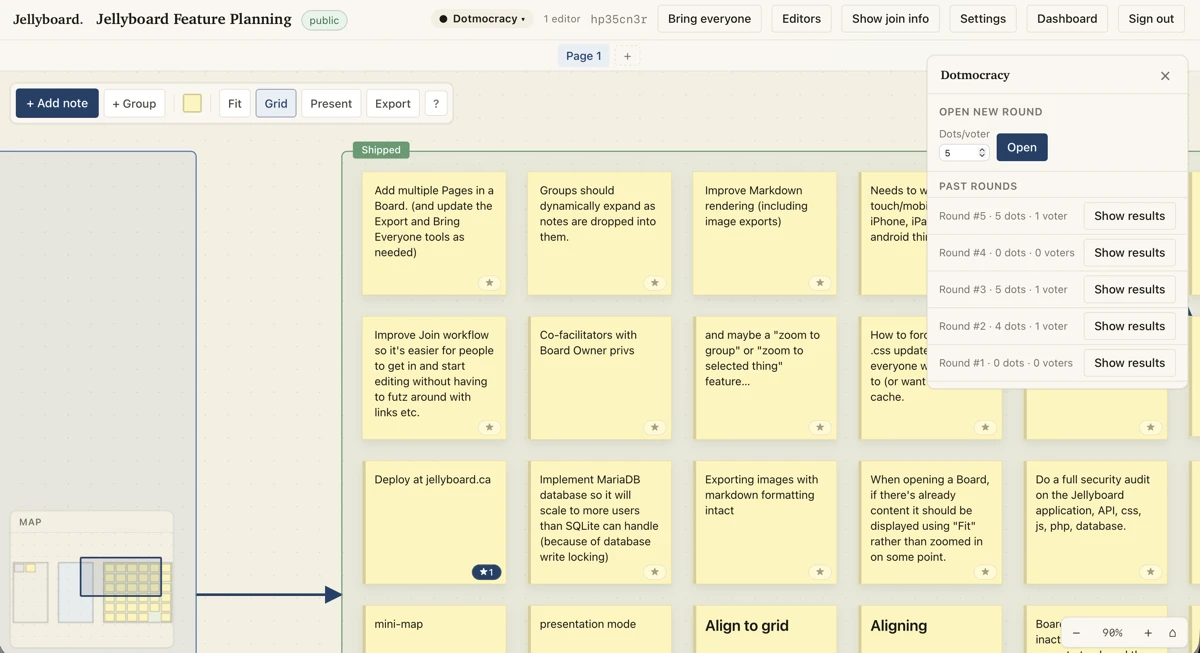
Screenshot of a Jellyboard
Zoomed in a bit (with auto-displayed mini-map), and with the dotmocracy panel open
Image by D'Arcy Norman
Dotmocracy voting
For prioritization, owners can open a named voting round with a dot budget ("you get 5 dots to assign however you want" or similar) and an optional page scope ("assign dots on this page" or “you can assign them on any page in this board”). Editors cast stackable, irrevocable dots on notes. Three display modes, selected by the board owner and/or co-facilitators:
- Cast. Voters see their own dots and live counts.
- Badge. All counts visible to everyone.
- Hidden. Counts hidden during voting, revealed after.
A summary panel ranks notes by score and clicks through to wherever the note lives, including across pages.
What you take away afterward
The artifacts a session produces shouldn’t be locked in the tool.
- PNG export of the current page, with paper background, dot grid, groups, connections, and markdown-formatted note text. File downloads as
{slug}-YYYY-MM-DD.png. - Zip bundle (facilitators only):
notes.csv,rounds.csv,round_votes.csv,notes.md,notes.json,board.json, plus aREADME_FOR_AI.mdfor handing off to an LLM or Nvivo or something else. Voter identity is anonymized. - Backup and restore: manual snapshots on demand, plus automatic snapshots every six hours. Restore replaces current state in a transaction, and a pre-restore snapshot is taken first.
- Per-board trash: notes deleted by users sit in a trash bin for 30 days before hard-delete, restorable from
/boards/{slug}/trash. - Public read-only sharing: share a board as a link without granting edit access. Curated public boards can be featured on the home page.
Try it
A live instance is running at jellyboard.ca. Sign in with your email, create a board, hand the join code to the room. If you break something, let me know. It’s still a prototype, and I’ll keep chipping away at implementing ideas to improve it. If it goes viral or something, my webserver may fall over - but it should be fine to use it for workshops etc. to see how it works.
ps.
Yes, Stephen, I’ll add it to Github at some point. I’m just wanting it to sit for a bit to see how stable it is (and how much of a support load it might add by adding the code…)